
Download Nobinge – AI‑Powered Text Summarizer for YouTube, Webpages & PDFs
Overview
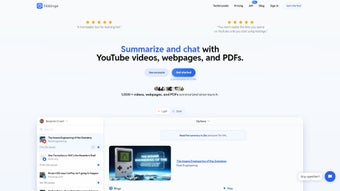
Nobinge is a cloud‑based AI text summarizer that turns long‑form content into bite‑size insights in seconds. Built on cutting‑edge natural language processing models, the platform can ingest YouTube video URLs, web pages, and PDF documents, then generate concise summaries, accurate answers to user‑posed questions, and downloadable transcripts. For students cramming for exams, professionals scanning industry reports, or casual readers who simply want to avoid endless advertisements, Nobinge offers a fast, secure, and subscription‑driven solution that respects privacy while delivering reliable results.
The service supports multiple languages, meaning you can summarize a French research paper or a Japanese tutorial without switching tools. Because everything runs in a browser, there’s no need for bulky installations; a simple internet connection is enough to start summarizing instantly. The interface is minimalist—just paste a link, choose the source type, and click “Summarize.” Within moments, the AI returns a clear, structured overview and a full transcript that can be saved as .txt or .srt for subtitle use.
By cutting out the noise and focusing on core ideas, Nobinge helps users reclaim valuable time, improve comprehension, and stay ahead in today’s information‑overloaded world.
Key Features
- Multi‑Source Summarization: Handles YouTube videos, web articles, and PDF files from a single dashboard.
- AI‑Generated Transcripts: Produces accurate, searchable transcripts for video content, supporting subtitle export.
- Multilingual Support: Summarizes content in over 15 languages, including English, Spanish, French, German, Chinese, and Japanese.
- Question‑Answer Engine: Users can ask specific questions about the source material and receive concise, context‑aware answers.
- Downloadable Outputs: Export summaries and transcripts in TXT, PDF, or SRT formats for offline reference.
- Ad‑Free Experience: Bypasses pre‑roll ads and promotional sections, delivering only the essential information.
- Secure Cloud Processing: All data is encrypted during transmission and never stored long‑term without user consent.
- Scalable Subscription Plans: From free trials to premium tiers that unlock higher word limits and priority processing.
- Responsive Web Design: Optimized for desktops, tablets, and smartphones, ensuring a consistent experience across devices.
- Continuous Updates: Regular model improvements keep summarization accuracy high and introduce new language packs.
Installation & Usage Instructions
Getting started with Nobinge is intentionally frictionless. Since it’s a web application, there is no traditional “installation” process; you simply need a modern browser (Chrome, Firefox, Edge, Safari) and an active internet connection. Follow these steps for a seamless experience:
- Create an Account: Visit nobinge.com and click “Sign Up.” Provide an email address, set a secure password, and verify your account via the confirmation link sent to your inbox.
- Select a Plan: After logging in, you’ll land on the dashboard. Choose between the free tier (limited to 3 summaries per day) or a premium subscription that offers unlimited summarizations, higher word counts, and priority queue processing.
- Paste Your Content URL: In the main input field, paste the YouTube video link, web page URL, or upload a PDF file by dragging it into the designated area.
- Choose the Content Type: Use the toggle buttons to specify whether you’re summarizing a video, article, or document. This helps the AI select the optimal parsing strategy.
- Initiate Summarization: Click the bright “Summarize Now” button. The backend AI begins processing; typical turnaround times range from 5 seconds for short articles to 30 seconds for lengthy PDFs.
- Review & Refine: The resulting summary appears in a clean, scrollable pane. If you need clarification, type a question in the “Ask a Question” box beneath the summary. The AI will generate a targeted answer.
- Download Results: Use the “Download” icons to save the summary as a .txt file or the transcript as an .srt subtitle file for video playback.
- Manage History: The “History” tab stores all your recent summarizations for up to 30 days, allowing quick re‑access or re‑download without re‑processing.
For power users, Nobinge offers an API key (available in the premium plan) that can be integrated into custom workflows, enabling automated summarization of bulk content directly from your own applications.
Compatibility, Pros & Cons
Because Nobinge runs entirely in the browser, it is compatible with any operating system that supports modern web standards. This includes Windows 10/11, macOS Ventura and later, Linux distributions with up‑to‑date browsers, as well as mobile platforms such as Android 8.0+ and iOS 13+. No additional plugins or runtime environments are required, making it a truly cross‑platform solution.
Pros
- Fast, AI‑driven summarization for multiple content types.
- Multilingual capability reduces the need for separate translation tools.
- Ad‑free results focus on core information, saving time.
- Secure, encrypted data handling protects user privacy.
- Responsive design works on desktops, tablets, and smartphones.
- Export options (TXT, PDF, SRT) cater to diverse workflow needs.
- Scalable pricing model accommodates casual users and enterprises alike.
Cons
- Reliance on an internet connection; offline use is not possible.
- Free tier limits daily summarizations, which may be restrictive for heavy users.
- Complex PDFs with heavy graphics may produce less accurate transcripts.
- AI summarization may occasionally omit niche details that a human reviewer would catch.
- Subscription pricing can be a barrier for students on tight budgets.
Frequently Asked Questions
How does Nobinge generate summaries for YouTube videos?
Nobinge extracts the audio track, runs it through a speech‑to‑text engine, and then applies a transformer‑based summarization model to the resulting transcript. The AI identifies key topics, removes filler content, and produces a concise overview that captures the video's main points.
Can I use Nobinge on a mobile device?
Yes. The platform’s responsive web design works seamlessly on Android and iOS browsers. All features—including summarization, transcript download, and multilingual support—are fully functional on smartphones and tablets.
Is my data stored after summarization?
Nobinge encrypts data during transmission and only retains it temporarily for processing. Summaries and transcripts are stored in your personal history for 30 days, after which they are automatically purged unless you manually export them.
What languages are currently supported?
The service supports English, Spanish, French, German, Italian, Portuguese, Dutch, Russian, Chinese (Simplified), Japanese, Korean, Arabic, Turkish, Swedish, and Norwegian, with additional language packs added regularly.
Do I need a subscription to download transcripts?
Downloading transcripts is available in both free and premium tiers, but the free plan limits the number of downloads per day. Premium subscribers enjoy unlimited downloads, higher word‑count limits, and priority processing.
Conclusion & Call to Action
In an era where information overload is the norm, Nobinge offers a practical, AI‑powered shortcut to the knowledge you actually need. Its ability to digest videos, articles, and PDFs into clear, actionable summaries—while preserving multilingual flexibility and robust security—makes it a standout tool for students, researchers, marketers, and busy professionals alike. Although an internet connection is required and the free tier imposes modest limits, the value delivered by premium access justifies the cost for anyone serious about efficient content consumption. Ready to transform how you learn and work? Sign up for Nobinge today, start your free trial, and experience the power of instant summarization at your fingertips.
Nobinge delivers fast, accurate summaries across multiple content formats, backed by solid multilingual support and a clean, ad‑free interface. While offline usage isn’t possible and the free plan is limited, the premium subscription unlocks unlimited processing and priority queues, making it a worthwhile investment for power users.



.png)



